
Advisories
KB5127648 Update Disables Smart App Control on Windows 11 24H2 and Later
The October 2026 Windows 11 security update KB5127648 can cause the Smart App Control setting to become grayed out on devices running version 24H2 and newer. Devices with the feature already enabled remain protected, but those that have it disabled cannot re‑enable it until Microsoft releases a fix. IT administrators can temporarily restore the toggle by applying a registry edit or a Group Policy change.
What happened
Microsoft’s KB5127648 security update for Windows 11 inadvertently disables the Smart App Control toggle on systems running version 24H2 and later. The feature, which works with Microsoft Defender and SmartScreen to block potentially harmful applications, becomes grayed out and cannot be turned on if it was previously disabled.
Impact
Only devices that had Smart App Control turned off before installing the update are affected. Devices that already had the feature enabled continue to operate normally and remain protected. The issue does not affect Windows 10 or earlier Windows 11 releases.
Workarounds
Microsoft has issued temporary mitigations for enterprise‑managed machines. Administrators can either modify the registry or apply a Group Policy setting to re‑enable the feature.
"After installing this update, some devices might be unable to turn on Smart App Control in the Windows Security app if it has been turned off. On affected devices, the option to turn on Smart App Control might be grayed out," Microsoft said.
- Registry: Add the DWORD
SmartAppControlEnabledwith value1toHKEY_LOCAL_MACHINE\SOFTWARE\Microsoft\Windows Defender\SmartAppControl. - Group Policy: Enable the policy “Turn on Smart App Control” under Computer Configuration → Administrative Templates → Windows Components → Windows Security.
What to do
• Verify whether Smart App Control is currently enabled on your endpoints.
• If disabled, apply the registry or Group Policy workaround on affected devices.
• Monitor Microsoft’s advisory channel for a permanent fix in a future cumulative update.
• Keep Defender and SmartScreen up to date to maintain baseline protection.
Related vulnerabilities
Microsoft Resolves Teams/Outlook Launch Failure on ARM Windows PCs
Microsoft has patched a bug that stopped Teams and the new Outlook from starting on ARM‑based Windows devices after the August 2026 Patch Tuesday updates. The issue hit fresh or un‑updated Surface Pro 11 and Surface Laptop 7 units running Windows 11 24H2 and later. A temporary fix was to install the Auto Super Resolution Package, but the final resolution came with the September 8, 2026 cumulative update (KB5124012). The company also addressed other August‑update glitches, from WPF printing errors to RGB‑lighting induced crashes.
Read briefing
Apple Unveils App Store Connect 2026 Update – New Features, Updated Guidelines, and Upcoming Compliance Requirements
On April 16, 2026 Apple rolled out a significant update to App Store Connect. The release introduces a revamped certificate management interface, tighter App Review criteria, and new security checks for visionOS apps. Developers will need to adjust to updated signing workflows and upcoming mandatory compliance rules that take effect later this year.
Read briefing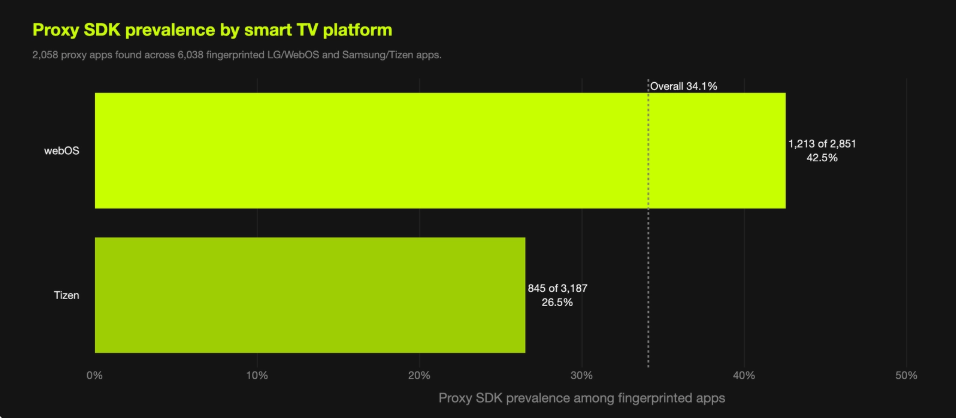
LG Bans Residential Proxy Apps from Smart TVs
LG Electronics will suspend any webOS app that turns a TV into an always‑on residential proxy. The move follows research showing over 42% of webOS apps embed proxy SDKs, exposing users to traffic routing and privacy risks.
Read briefing
Apple Releases iPadOS 17.7.11 Security Patch to Developers
On May 11, 2026, Apple rolled out iPadOS 17.7.11 (build 21H461) to the developer community. Though the public release notes are minimal, the update is presumed to address critical bugs and security issues discovered in earlier releases. Developers are encouraged to download the new build, test app compatibility, and stay alert for any disclosed CVEs.
Read briefing