
Malware
ValleyRAT Backdoor Distributed via Signed Adware and DLL Sideloading
Threat actors are distributing the ValleyRAT backdoor disguised as a signed adware application called QN Wallpaper. The campaign uses DLL sideloading to execute malicious payloads while distracting users by installing legitimate software like Google Chrome or DingTalk. SecOps and system administrators should audit autorun entries, monitor unexpected DLL loading, and inspect endpoint exclusions.

What Happened
Researchers analyzed a malicious installer (MD5: c24e99f9437feacaa63766a3cde3fe3d) initially mistaken for standard adware. The application uses valid developer signatures and mimics legitimate software distribution networks. Depending on file naming suffixes, the installer performs decoy actions such as setting up Google Chrome or DingTalk, or opening Tencent Meeting URLs, to distract the user from background malicious activities.
Infection Chain and Mechanics
Regardless of the decoy action, the installer deploys a modified version of QN Wallpaper, a genuine desktop wallpaper utility classified as adware. The application is installed into C:\Program Files\QNWallpaper\5.4.0.1662\<random string> and registered for persistence via the Windows registry autorun keys.
Attackers leverage this trusted, signed adware framework to execute a DLL sideloading attack:
- The installer drops an archive containing malicious components alongside legitimate binaries.
- The signed QN Wallpaper process loads a malicious DLL instead of the expected library.
- Execution leads directly to the deployment of the ValleyRAT backdoor on the endpoint.
Why This Technique Is Used
Threat actors utilized this specific distribution vector for several operational advantages:
- Code Signing: The base adware application is signed by a valid developer certificate, helping bypass basic trust checks.
- User Exclusions: Users frequently add adware and productivity tools to security software exclusion lists to preserve unwanted functionality, inadvertently shielding the malware from detection.
What to Do
Defenders and system administrators should implement the following mitigation steps:
- Audit endpoint software inventories for unauthorized instances of QN Wallpaper or similar bundled adware tools.
- Inspect registry autorun locations and startup folders for suspicious binaries residing in Program Files subdirectories.
- Monitor for DLL sideloading activity, particularly signed third-party applications loading unexpected local DLLs.
- Review security exclusions across endpoints to ensure users have not whitelisted adware or potentially unwanted programs (PUPs).
Related articles

BLOODALCHEMY Backdoor Exploits Brother BrDifxapi DLL Side-Loading
A new x86 backdoor, BLOODALCHEMY, injects shellcode into the signed Brother BrDifxapi.exe utility via a side‑loaded unsigned DLL named BrLogAPI.dll. The payload is not reflexive and requires a specific loader, making it vulnerable to DLL side‑loading attacks. Defenders should audit Brother binaries, enforce DLL signing, and monitor for unauthorized DLL injection.
Read briefing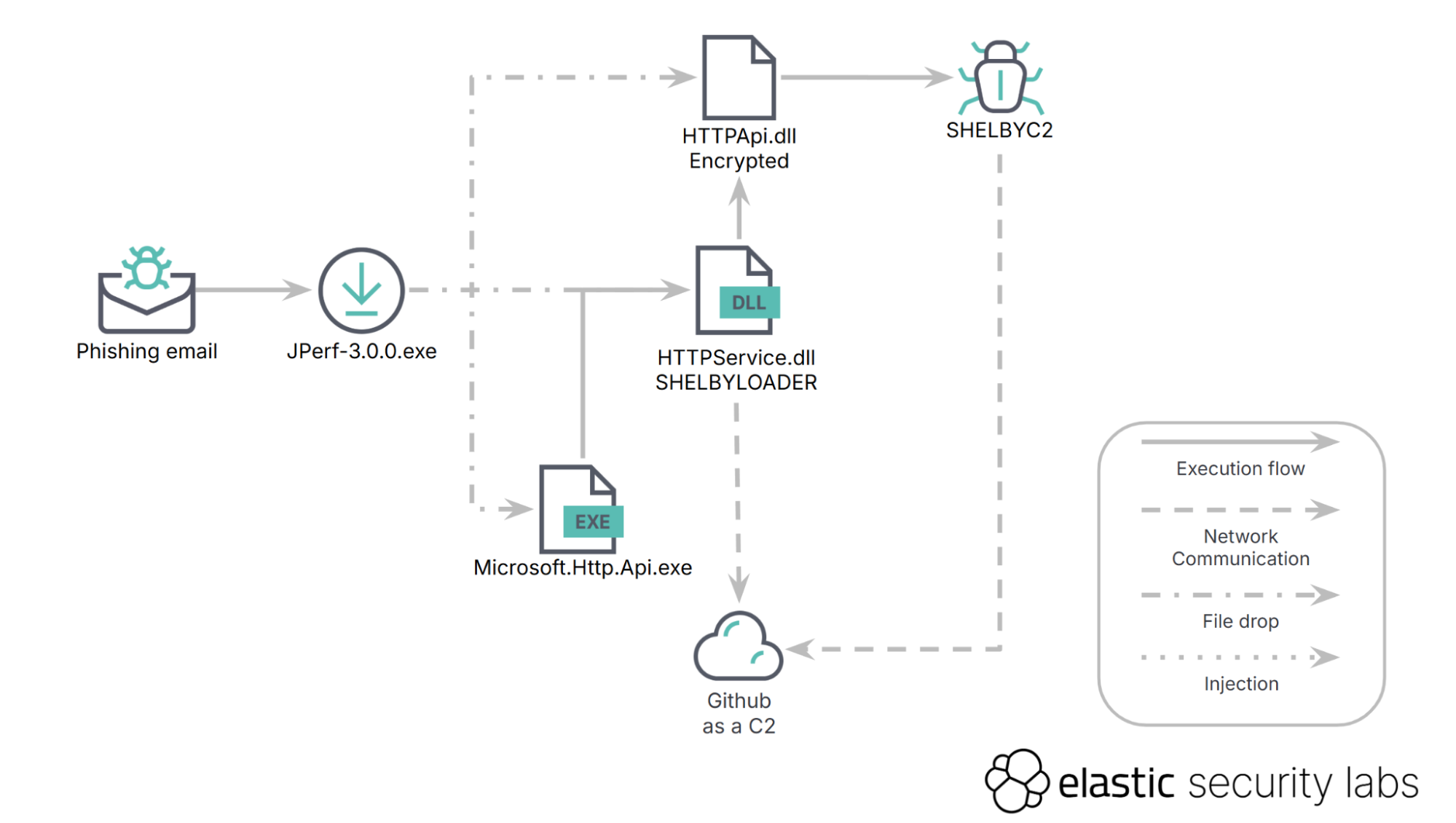
SHELBY Malware Uses GitHub C2 and PAT Tokens – Immediate Defender Actions
SHELBY infects machines via a phishing attachment that installs a loader which retrieves a backdoor from GitHub using a PAT token. The token grants full control, exposing a critical flaw. Defenders should block PAT token usage, monitor GitHub repos, and update detection rules.
Read briefing
Deimos Remote Access Tool: Updated TTPs and Elastic Security C2 Takedown
Elastic Security dismantled the command‑and‑control infrastructure of the Deimos remote‑access implant, exposing its advanced obfuscation and signed lure tactics. The implant delivers initial access, persistence, and full C2 capabilities, making it a potent threat. Defenders should block known C2 endpoints, deploy detection rules, and monitor for suspicious signed binaries.
Read briefing
RTM Group Banking Trojan Infection: Forensic Findings and Defender Actions
A forensic investigation of a workstation infected with a banking trojan distributed by the RTM group revealed credential theft, persistence, and lateral movement. Defenders should isolate affected hosts, review authentication logs, and deploy EDR signatures to mitigate future attacks.
Read briefing