
Threat Intel
Advanced Linux Persistence Detection: New Guidance on Init Scripts and Custom Tools
Elastic Security’s latest Linux persistence series expands beyond Systemd to cover System V and Upstart init scripts, and introduces PANIX for testing persistence. Defenders can now deploy pre‑built detection rules, audit critical init directories, and validate coverage with the new tool.

What Was Covered
Elastic Security released a third installment of its Linux persistence series, focusing on advanced boot and logon initialization scripts beyond Systemd, and introducing the PANIX tool for testing persistence setups.
Key Persistence Techniques
- System V init scripts placed in /etc/init.d or /etc/rc.d
- Upstart job files under /etc/init
- Custom scripts in /etc/rc.local or user crontabs that survive reboots
Detection Strategies
Deploy Elastic’s pre‑built detection rules for T1037 activity. Use SIEM queries that flag unexpected changes to init directories, new executable permissions, or anomalous process launches at boot time.
Practical Steps for Defenders
- Enable all Elastic pre‑built rules and keep them updated.
- Run the PANIX tool in a controlled environment to generate persistence artifacts and validate rule coverage.
- Audit /etc/init.d, /etc/rc.d, /etc/init, and /etc/rc.local for unauthorized entries.
- Configure OSQuery hunts for “init script modifications” and “boot‑time process execution.”
- Implement file integrity monitoring on key directories and alert on permission changes.
Next Steps
Regularly review the detection rule set, keep the Elastic Security platform at the latest version, and conduct tabletop exercises simulating persistence attacks to ensure detection readiness.
Related articles

Elastic Security Labs Releases LLM Safety Assessment Report
Elastic Security Labs has published a new LLM safety assessment report that outlines practical threats to large language models and offers guidance for defenders. The report focuses on data mapping, normalization, and detection strategy for AI‑driven threats. SecOps teams should review the findings and start implementing the recommended detection steps.
Read briefing
Using Auditd and Auditd Manager for Real‑Time Linux Detection
Auditd provides kernel‑level event logging for Linux, enabling precise detection of suspicious activity. Elastic’s Auditd Manager simplifies rule deployment across hosts, letting defenders focus on threat hunting rather than configuration drift. This briefing outlines how to enable Auditd, craft rules, and integrate with Elastic Stack for actionable alerts.
Read briefing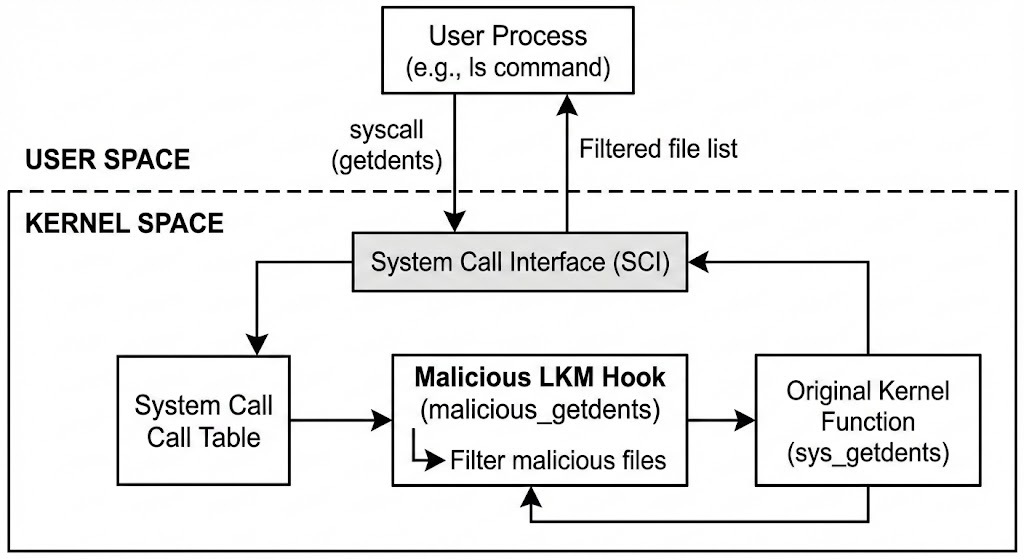
Linux Rootkits: Hooking Evolution and Defensive Implications
Linux rootkits have moved from simple user‑space hijacking to sophisticated eBPF and io_uring hooks that embed malicious logic directly into the kernel. Attackers use these techniques to evade detection and maintain persistence. Defenders should monitor kernel integrity, audit eBPF programs, and validate system call tables to spot anomalous hooks.
Read briefing
CrowdStrike & Anthropic Join Forces to Strengthen AI‑Powered Defense for Critical Infrastructure
CrowdStrike has partnered with Anthropic to provide AI‑driven continuous authorization and threat detection for critical infrastructure. The collaboration expands Falcon’s capabilities into OT environments and offers defenders new tools to detect AI‑generated attacks. SecOps teams should evaluate integration options and update monitoring for AI‑driven anomalies.
Read briefing