
Threat Intel
Conditional Access Misconfigurations Let Attackers Bypass MFA in 55 Microsoft 365 Organizations
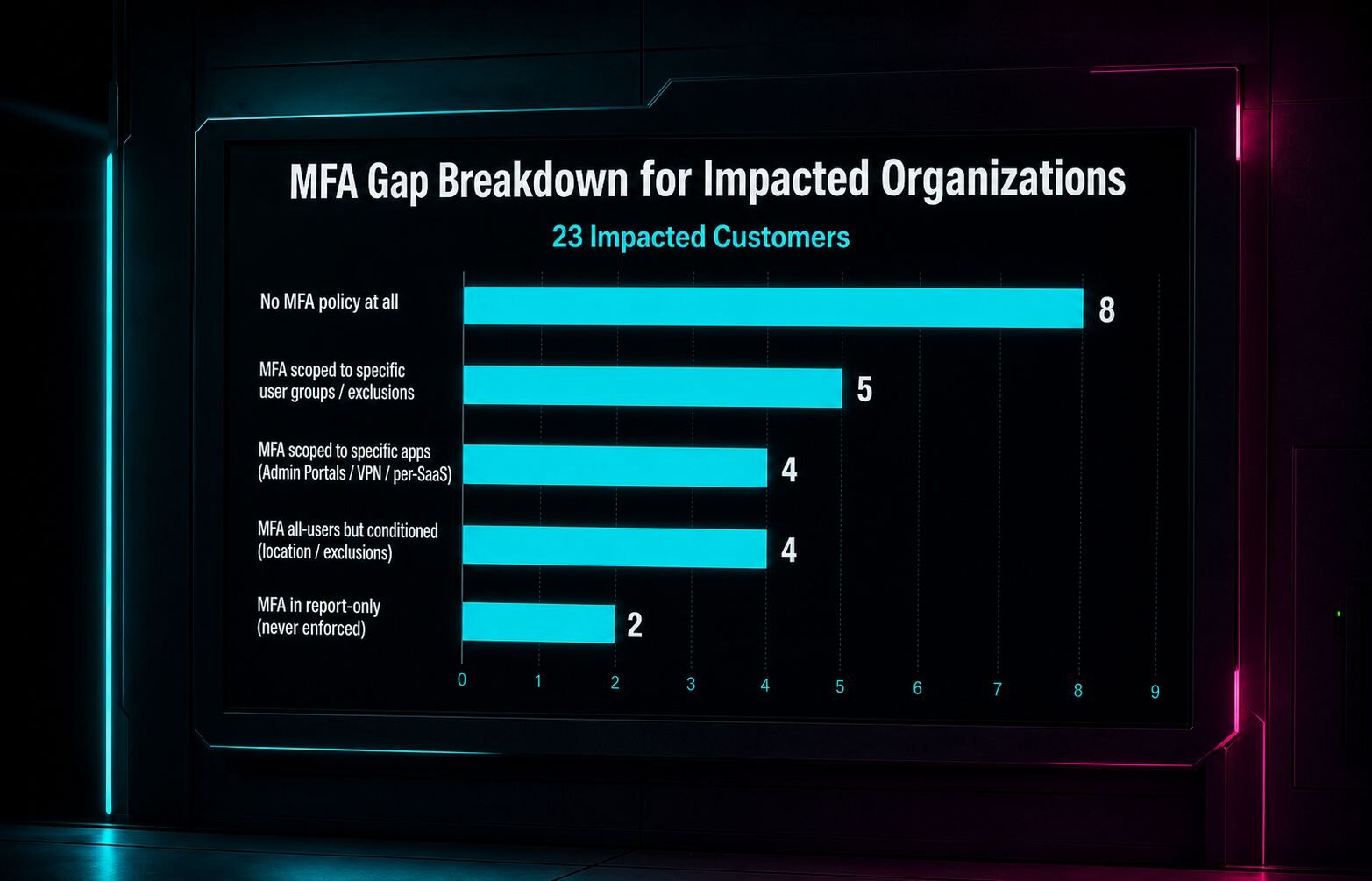
Two attacks exploited misconfigured Conditional Access policies in Microsoft 365, allowing adversaries to compromise accounts even with MFA enabled. Huntress identified 55 organizations with gaps that could be closed with proper policy enforcement and continuous monitoring. Defenders should audit policies, enforce MFA for all users, and use automated hardening tools to prevent similar breaches.
What happened
Two separate Microsoft 365 attacks bypassed Conditional Access policies that appeared fully configured, revealing gaps that let attackers compromise accounts even with MFA enabled.
Impact
- 55 organizations identified with misconfigured Conditional Access settings.
- Attackers leveraged weak or missing policy enforcement to elevate privileges and access sensitive data.
- Incidents occurred in environments using Azure AD, Microsoft 365, and Office 365 services.
What to do
- Audit Conditional Access policies for scope, grant controls, and session controls.
- Ensure MFA is enforced for all privileged and external users, and that policy assignments include all relevant user groups.
- Implement continuous monitoring with tools like Huntress Managed ISPM to detect policy drift and misconfigurations.
- Apply the “Require MFA for all sign‑ins” policy and enable “Block legacy authentication” to close common attack vectors.
- Review and tighten sign‑in risk policies, setting thresholds for suspicious activity.
Preventive Measures
Regularly review Conditional Access logs, enforce least‑privilege access, and use automated hardening services to keep policies current.
Related articles
UNC6671’s BlackFile Vishing Campaign Targets Microsoft 365 & Okta – Defenders’ Response
In early 2026, UNC6671 launched a vishing‑based extortion operation, leveraging adversary‑in‑the‑middle techniques to compromise SSO and bypass MFA on Microsoft 365 and Okta. The group uses Python and PowerShell scripts to exfiltrate data before demanding ransom. Defenders should monitor voice‑phishing indicators, enforce MFA, and scrutinize SSO logs for anomalous activity.
Read briefing
Passkey‑Themed Phishing Drives Microsoft 365 Data Breaches
Extortion gangs tied to ShinyHunters, Helix and others are exploiting the hype around passkeys and single sign‑on to trick corporate employees into revealing Microsoft 365 credentials. By impersonating IT help desks and using custom phishing domains, attackers capture session tokens through adversary‑in‑the‑middle and device‑code flows, then exfiltrate data from Office 365. Microsoft’s latest research maps the post‑compromise activity and highlights the need for tighter MFA enforcement.
Read briefing
UNC6671 Continues Vishing Extortion Campaigns Across Multiple Brands Targeting Financial Services and Cloud Environments
UNC6671 has rebranded its extortion operations into Redact, Pink, Helix, and Falcon while maintaining a vishing‑based approach to steal credentials and MFA tokens. The group targets Microsoft 365 and Okta accounts in financial services, private equity, and professional services firms. Defenders should verify support calls, enforce MFA, and educate staff on spoofed login portals.
Read briefing
N0va Phishkit Campaign Targets US & EU Businesses via Legitimate SSO Abuse
A new phishing operation, dubbed N0va Phishkit, has been observed targeting organizations in North America and Europe. Attackers mimic trusted services and hijack legitimate authentication flows to harvest access and refresh tokens, granting attackers SSO access to corporate resources. Defenders should monitor for anomalous authentication requests, enforce MFA, and review token usage.
Read briefing