
Threat Intel
Passkey‑Themed Phishing Drives Microsoft 365 Data Breaches
Extortion gangs tied to ShinyHunters, Helix and others are exploiting the hype around passkeys and single sign‑on to trick corporate employees into revealing Microsoft 365 credentials. By impersonating IT help desks and using custom phishing domains, attackers capture session tokens through adversary‑in‑the‑middle and device‑code flows, then exfiltrate data from Office 365. Microsoft’s latest research maps the post‑compromise activity and highlights the need for tighter MFA enforcement.
In a new wave of social‑engineering attacks, threat actors linked to ShinyHunters, Helix, and other extortion outfits are targeting corporate Microsoft 365 accounts by masquerading as IT support. The lures revolve around the latest passkey and single sign‑on (SSO) buzz, urging employees to “update” or “sync” their credentials before access is revoked.
How the Phish Works
- Researchers first harvest public data on employees and company structure.
- Attackers register domains that mimic Microsoft login pages, often appending the victim’s company name as a sub‑domain (e.g., company-name.secure-passkey.com).
- Victims receive calls or SMS messages from a spoofed IT desk, claiming a passkey or MFA issue.
- They are directed to a phishing site that looks like Microsoft’s portal.
- Two main techniques are used: adversary‑in‑the‑middle (AiTM) to steal credentials and session tokens, and device‑code phishing that tricks users into authorizing an attacker‑controlled client via Microsoft’s legitimate authentication flow.
Who’s Behind It
- Storm‑3121 – linked to ShinyHunters and Falcon extortion.
- Storm‑3032 – tied to BlackFile members now operating under Helix.
- UNC6671 cluster – previously documented by Google, also tied to the same extortion groups.
What Happens After Compromise
Microsoft’s investigation revealed that once an attacker gains a foothold, they log into Microsoft 365 from an unmanaged device, often accessing the Office 365 portal (identified as “OfficeHome” in Entra logs). From there, data can be exfiltrated with relative ease.
"The actors invest heavily in pre‑attack research, gathering employee details from public sources to make the phishing look authentic," Microsoft said.
Mitigation Tips
- Verify any passkey or MFA update request through a known internal channel.
- Enable Microsoft’s built‑in risk‑based conditional access to block unmanaged devices.
- Educate staff about the look of legitimate Microsoft login pages and the dangers of SMS‑based authentication requests.
- Regularly audit and monitor sign‑in logs for unusual activity.
Related articles
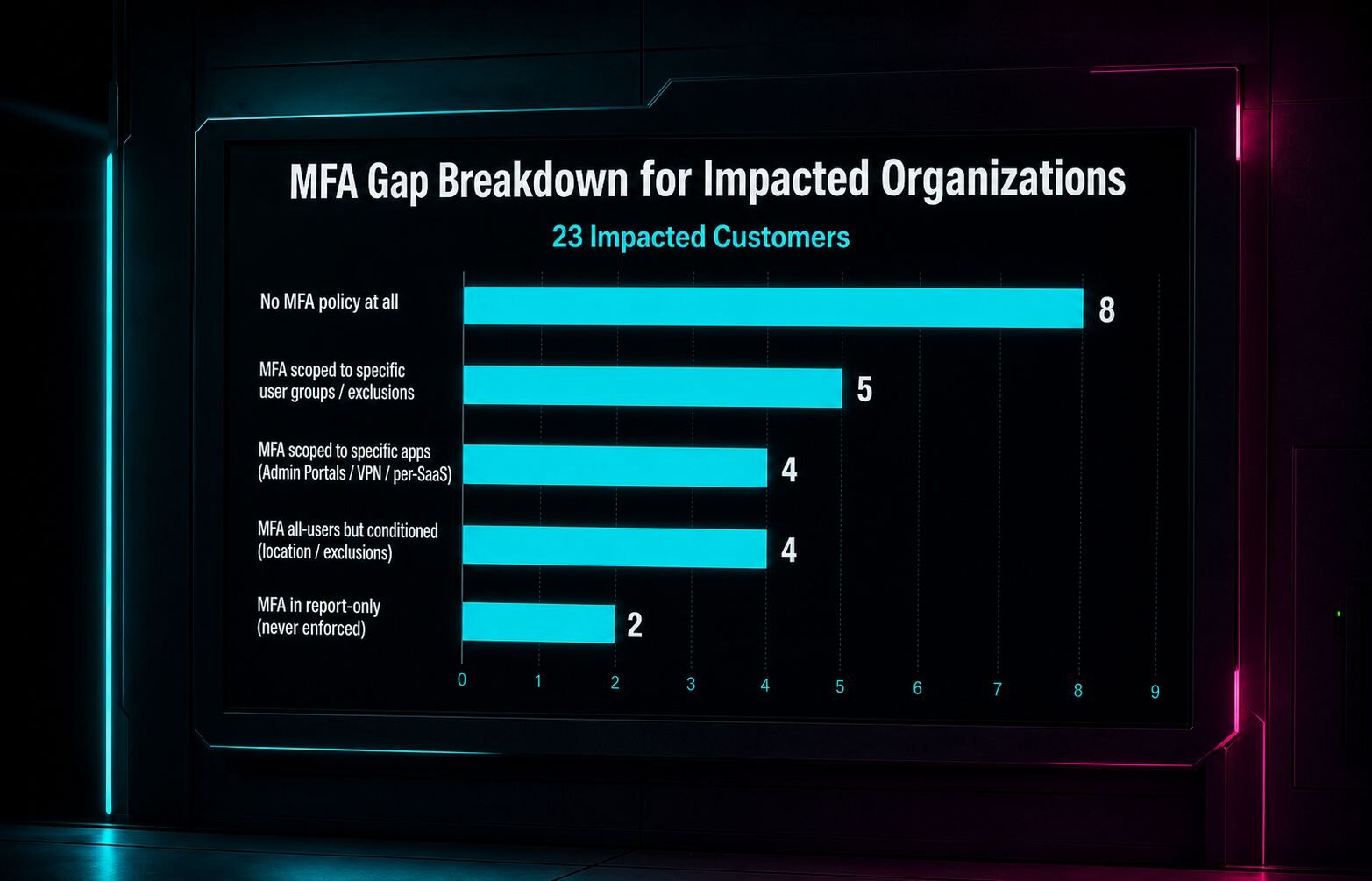
Conditional Access Misconfigurations Let Attackers Bypass MFA in 55 Microsoft 365 Organizations
Two attacks exploited misconfigured Conditional Access policies in Microsoft 365, allowing adversaries to compromise accounts even with MFA enabled. Huntress identified 55 organizations with gaps that could be closed with proper policy enforcement and continuous monitoring. Defenders should audit policies, enforce MFA for all users, and use automated hardening tools to prevent similar breaches.
Read briefing
UNC6671’s BlackFile Vishing Campaign Targets Microsoft 365 & Okta – Defenders’ Response
In early 2026, UNC6671 launched a vishing‑based extortion operation, leveraging adversary‑in‑the‑middle techniques to compromise SSO and bypass MFA on Microsoft 365 and Okta. The group uses Python and PowerShell scripts to exfiltrate data before demanding ransom. Defenders should monitor voice‑phishing indicators, enforce MFA, and scrutinize SSO logs for anomalous activity.
Read briefing
Industrialized MaaS Drives Fake Coretax App Fraud in Indonesia
During Indonesia’s tax season, attackers pushed a counterfeit Coretax mobile application using a shared malware‑as‑a‑service platform. The infrastructure enables rapid brand abuse and phishing, targeting taxpayers and financial institutions. Defenders should block known malicious domains, monitor for Coretax app impersonations, and harden endpoint detection.
Read briefing
Tycoon 2FA AiTM: The Phishing‑as‑a‑Service Threat That Bypasses MFA on Entra ID & Google Workspace
Tycoon 2FA, the top‑selling phishing‑as‑a‑service kit, has evolved into a sophisticated adversary‑in‑the‑middle tool that captures MFA‑protected session tokens for Microsoft 365 and Google Workspace. After a March 2026 takedown, operators pivoted to device‑code phishing and OAuth abuse, keeping the kit at the forefront of global phishing trends. Elastic’s new detection rules map telemetry fingerprints across both platforms, enabling rapid incident containment in under ten seconds via Elastic Workflows.
Read briefing