
Identity
M365 Token Spray Campaign Uses AiTM and Rogue Entra Devices to Bypass MFA
A 10-week campaign targeted Microsoft 365 tenants using AI-driven token spraying and replay attacks. Attackers deployed rogue Entra ID devices and manipulated MFA settings to maintain persistent access. Defenders must audit device registrations and review inbox rules immediately.
What Happened
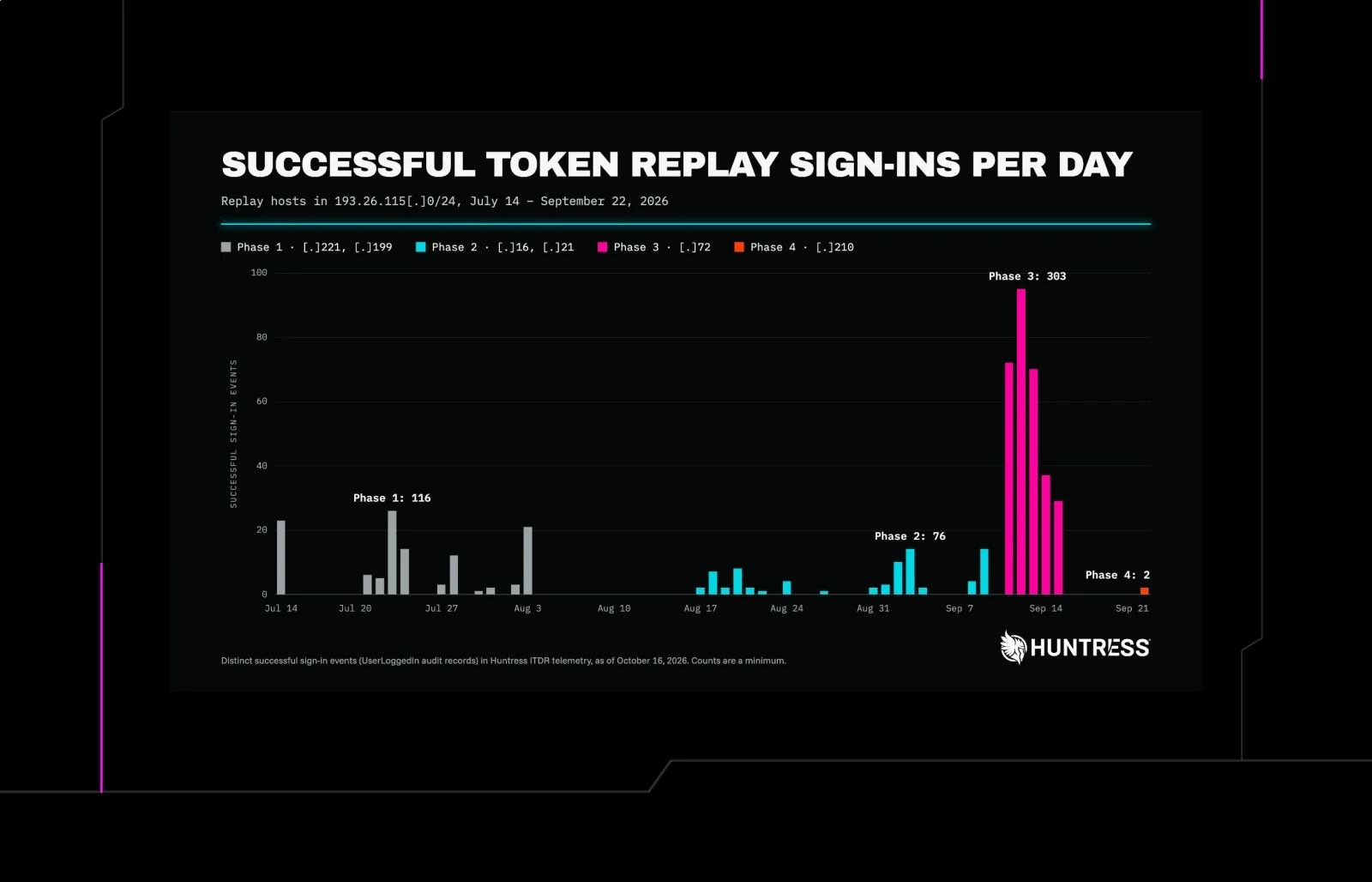
Security researchers at Huntress have documented a sustained, ten-week campaign targeting Microsoft 365 environments. The operation combined adaptive identity theft (AiTM) proxy relays with aggressive token replay techniques to compromise business email accounts. Unlike traditional credential stuffing, this campaign leveraged valid session tokens to bypass multi-factor authentication (MFA) and establish persistent footholds within tenant directories.
The attack chain began with the interception of valid authentication tokens via AiTM relays. Once initial access was gained, threat actors did not simply exfiltrate data; they actively modified the identity infrastructure to ensure their access remained undetected. This included the registration of rogue devices in Microsoft Entra ID and the manipulation of MFA policies, creating a complex web of legitimate-looking artifacts that obscured malicious activity.
Who Is Affected
Any organization relying on Microsoft 365 for primary email and identity management is potentially at risk. The campaign specifically targeted tenants where users had active sessions that could be intercepted or where token replay was feasible. This includes both small-to-medium businesses and larger enterprises that have not implemented strict conditional access policies or device compliance requirements.
Particular attention should be paid to tenants where users have recently changed their MFA methods or where new devices have been registered without corresponding help desk tickets. The attackers focused on business email accounts, suggesting a primary goal of phishing, data exfiltration, or further lateral movement within the organization. If your organization has experienced unexplained MFA prompts or new device registrations in the last three months, you should assume potential compromise.
Impact
The primary impact of this campaign is the complete bypass of MFA protections. By replaying valid tokens, attackers gained access to user mailboxes and administrative interfaces without triggering standard MFA challenges. This allowed them to read, forward, and delete emails, as well as modify account settings to maintain access. The use of rogue Entra devices further complicated detection, as these devices appeared as trusted endpoints in the identity directory.
Additionally, the campaign involved the creation of hidden inbox rules, which automatically forwarded emails to external addresses or deleted them after a certain period. This technique is designed to evade user detection and ensure that sensitive communications are intercepted before the legitimate user is aware of the breach. The combination of token replay, device spoofing, and inbox rule manipulation creates a high-fidelity persistence mechanism that is difficult to detect using standard SIEM rules alone.
Exposure
The exposure in this campaign stems from the reliance on token validity rather than device or user context for access control. Many organizations treat a valid token as proof of identity, failing to verify the device or network location from which the token is being used. This gap allows attackers to replay tokens from compromised endpoints or through proxy relays, effectively impersonating legitimate users.
Furthermore, the registration of rogue devices in Entra ID highlights a weakness in device onboarding and monitoring. If organizations do not actively monitor for new device registrations or require MFA for device enrollment, attackers can easily add malicious devices to the directory. These devices can then be used to bypass conditional access policies that rely on device compliance or trusted location checks. The lack of visibility into device health and registration history is a critical exposure point.
What To Do
Defenders should immediately audit their Microsoft Entra ID tenant for suspicious device registrations. Look for devices that were registered recently, especially those with generic names or those registered from unusual IP addresses. Revoke access for any devices that cannot be verified as legitimate. Additionally, review MFA settings for all users to ensure that no unauthorized changes have been made, such as the removal of MFA methods or the addition of new recovery codes.
- Review Entra ID sign-in logs for token replay patterns, focusing on sessions that use the same token from different IP addresses or user agents.
- Audit all registered devices in Entra ID and remove any that are not recognized or were registered without a corresponding help desk request.
- Check all user mailboxes for hidden inbox rules, particularly those that forward emails to external domains or delete messages after a set period.
- Enforce conditional access policies that require device compliance and MFA for all access, regardless of token validity.
- Enable and monitor audit logs for MFA changes, device registrations, and inbox rule modifications in Microsoft 365.
What To Watch
Monitor for signs of token replay in your identity provider logs. Look for sessions that are active for extended periods or that use tokens that have been revoked but are still being used. Pay attention to sign-ins from new or unusual locations, especially if they are accompanied by MFA bypass attempts. Additionally, watch for spikes in device registration activity, which may indicate an ongoing campaign to add rogue devices to your tenant.
Keep an eye on inbox rule modifications, as these are often a precursor to data exfiltration. If users report missing emails or unexpected forwarding, investigate immediately. Finally, stay updated on threat intelligence regarding AiTM and token replay techniques, as attackers are constantly evolving their methods to bypass MFA and other security controls. Regularly review your security posture and adjust your policies to address emerging threats.
Related articles

Tycoon 2FA AiTM: The Phishing‑as‑a‑Service Threat That Bypasses MFA on Entra ID & Google Workspace
Tycoon 2FA, the top‑selling phishing‑as‑a‑service kit, has evolved into a sophisticated adversary‑in‑the‑middle tool that captures MFA‑protected session tokens for Microsoft 365 and Google Workspace. After a March 2026 takedown, operators pivoted to device‑code phishing and OAuth abuse, keeping the kit at the forefront of global phishing trends. Elastic’s new detection rules map telemetry fingerprints across both platforms, enabling rapid incident containment in under ten seconds via Elastic Workflows.
Read briefing
tenfold Community Edition Adds Shared Content Governance and Real‑Time Event Auditing
tenfold has expanded its free Community Edition for organizations under 150 users with two new capabilities: shared‑content access reviews and centralized event auditing. These additions help teams manage Microsoft 365 sharing and investigate suspicious identity activity. Defenders should enable the features and review existing shared‑content permissions.
Read briefing
CrowdStrike Launches Agentic Identity Provider to Secure AI Agent Access
CrowdStrike has introduced an Agentic Identity Provider that assigns trusted identities to every AI agent and enforces real‑time, context‑based access controls. The feature expands modern privileged access management and is available to Falcon users. Defenders should integrate the identity provider, audit AI agent permissions, and adjust policy rules to reflect dynamic threat contexts.
Read briefing
CrowdStrike Unveils Agentic Identity Provider: Trusted Identities for AI Agents
CrowdStrike has added an Agentic Identity Provider to its Falcon platform, giving each AI agent a unique, context‑aware identity. This allows defenders to enforce least‑privilege access and audit AI actions in real time. Deploying the feature helps tighten privileged access and reduce blast radius for AI‑driven operations.
Read briefing